



EasyReader App gives you free access to over 40 libraries and book collections around the world. It enables you to enjoy books and read the way you prefer, on a wide range of devices.
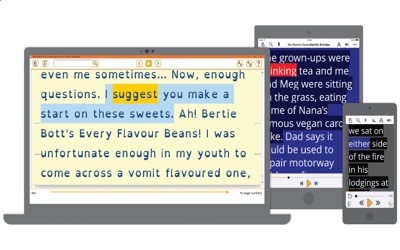
VIDEO DEMONSTRATION OF IT IN USE
Benefits of EasyReader App
Flexibility to Read Your Own Way
• Use EasyReader App to browse libraries and accessible newspaper stands, then download and read for pleasure or for study, in ways that suit your vision and your reading preferences.
• When you access books and read in ways that reflect your needs and reading style, you find enjoyment in reading and get more from books. So, whether you're reading for leisure or learning, access to books enables you to thrive, in school, at work and at home.
• Sign in to your favorite talking book libraries through EasyReader App and customize your reading experience. You can adjust text, color schemes and speech, or attach a braille display if that's your preference.
——————————————————————
EasyReader App Features

• Connect to Libraries
With over 45 libraries listed, EasyReader has the largest collection of accessible libraries and talking newspaper stands in the world, so you have access to millions of books.
• Customize Text
Choose your preferred fonts – including dyslexia-friendly fonts – customize colors of fonts and backgrounds, magnify the text size and adjust letter and line.
• Text & Speech Sync
Text and audio are perfectly synchronized so you can read along as you listen. EasyReader highlights the text as it reads it aloud, so you always find your place.
• Read from Clipboard
Copy text from anywhere on your device and listen to it in EasyReader App. Read up to ten clipboard texts free. Adjust reading speed and pronunciation as needed.
• Read with Audio
Play narrated audio books, or have text-only books and newspapers read aloud by human-sounding synthesized speech. Speech synchronizes with on-screen text highlights.
• Read a Range of Formats
EasyReader reads the widest range of book and document formats. including DAISY 2, DAISY 3, ePub, MathML, Microsoft Word documents, HTML and text files.
• Easy Navigation
Easily move around books, using the intuitive navigation to skip forward and backward or skip to any page or chapter. You can also search for keywords or phrases in the text.
• Add Bookmarks and Notes
To aid navigation, you can bookmark your favourite passages of text and add notes to each bookmark for future reference.
• Open More Content
Import up to ten files from your device to read with accessibility features in EasyReader App. For more than ten, you should upgrade to EasyReader Personal.